From Hobbyist to Pro: How Snapmaker U1 Turns Desktop 3D Printing Into a Production Machine
Jun 16, 2026
Desktop 3D printing has traditionally been seen as a creative playground. Makers, students, and hobbyists use it to prototype ideas, print fun objects,
Introduction: The Shift From Experimentation to Production
Desktop 3D printing has traditionally been seen as a creative playground. Makers, students, and hobbyists use it to prototype ideas, print fun objects, or experiment with design concepts. But over the last few years, something important has changed. The line between hobbyist printing and professional manufacturing has started to blur.
Today, independent creators are selling products, running Etsy stores, producing prototypes for startups, and even replacing small-scale manufacturing workflows with desktop machines. At the center of this shift is a new expectation: 3D printers are no longer just tools for experimentation. They are becoming production machines.
This is where the Snapmaker ecosystem and the Snapmaker U1 3D Printer come in. Together, they represent a transition from casual printing to structured, scalable production without requiring industrial-level investment.
The Limitations of Entry-Level 3D Printers
For many users, the journey begins with an entry-level 3D printer. These machines are affordable, accessible, and perfect for learning the basics of additive manufacturing. However, as users grow more experienced, limitations start to become clear.
One of the biggest constraints is speed. Entry-level printers often prioritize affordability over performance, meaning print times are long and throughput is low. A single complex model can take hours or even days to complete. For hobby use, this is manageable. For production, it becomes a bottleneck.
Another limitation is material and color handling. Most beginner systems are single-nozzle machines, meaning multi-color or multi-material printing requires manual filament swaps or inefficient purge processes. This leads to wasted material, inconsistent results, and increased production time.
Reliability is another challenge. Inconsistent calibration, adhesion issues, and print failures are acceptable in hobby settings but costly in production environments. A failed print is not just a technical issue; it becomes wasted time, wasted material, and missed deadlines.
Finally, scalability is nearly impossible. Even if a user wants to produce 50 or 100 units of a product, entry-level printers are not designed for continuous, repeatable output. They require constant supervision and manual intervention.
These limitations create a natural ceiling. At some point, every serious maker encounters a turning point where casual printing is no longer enough.
The Turning Point: When Speed and Reliability Matter More Than Experimentation
The transition from hobbyist to professional does not happen overnight. It usually begins with a simple realization: time is becoming more valuable than experimentation.
For some users, it starts when they begin selling products online. Suddenly, every hour spent waiting for a print matters. For others, it begins when they start working with clients who expect deadlines and consistency. A failed print is no longer just frustrating; it becomes a financial loss.
At this stage, two factors become critical: speed and reliability.
Speed determines how many units can be produced in a given timeframe. Reliability determines whether those units are usable or wasted. Together, they define whether a desktop printer can function as a production machine.
This is where Snapmaker U1 becomes a major turning point. Instead of treating 3D printing as a slow, single-stream process, it introduces a system designed for continuous, efficient output. Combined with the Snapmaker ecosystem, it transforms the workflow from manual control into structured production.
How Snapmaker U1 Enables Batch Production of Multi-Color Prints
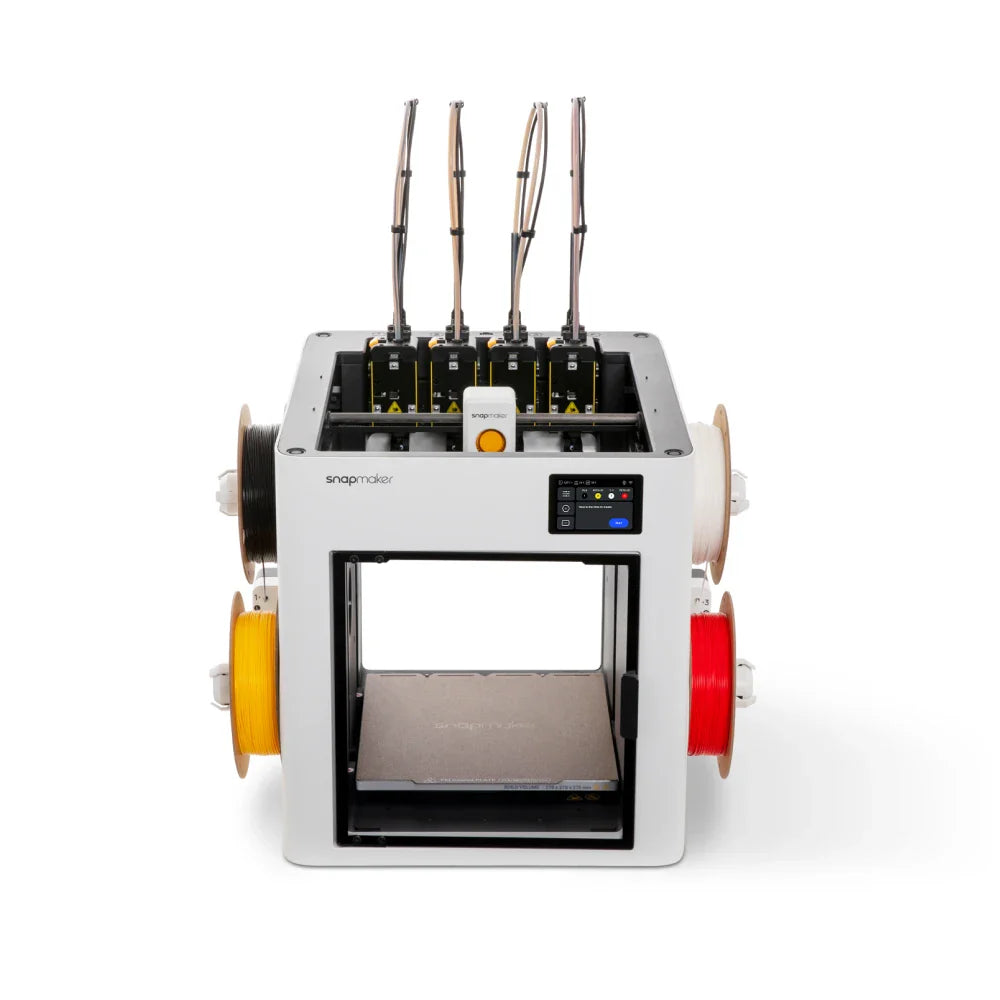
The Snapmaker U1 3D Printer is designed with production efficiency in mind. One of its most important innovations is its multi-toolhead system, which allows rapid switching between materials and colors without the traditional waste associated with filament purging systems.
Instead of relying on a single nozzle that constantly switches filaments, the U1 uses multiple toolheads. This approach significantly reduces downtime and eliminates the need for repeated filament flushing, which is a common inefficiency in traditional multi-color printing setups.
For creators, this has a direct impact on production capability. Multi-color prints that previously required complex manual intervention or slow processes can now be executed more efficiently and consistently. Designs that include color separation, functional material differences, or detailed aesthetics become far easier to produce at scale.
Batch production also becomes more practical. Instead of printing one complex object at a time, users can prepare structured print queues and run multiple items with consistent output quality. This is essential for small businesses producing product lines, limited editions, or custom orders.
Another important factor is consistency. Because tool switching is more controlled and predictable, the final output remains stable across batches. This reduces variation between printed items, which is critical when selling physical products.
In simple terms, the Snapmaker U1 removes many of the friction points that prevent desktop 3D printing from becoming a true production method.
The Snapmaker Ecosystem: Reducing the Learning Curve
While the hardware is important, the Snapmaker ecosystem plays an equally critical role in enabling users to scale from hobbyist to professional.
The ecosystem includes software tools, slicing workflows, and device management systems that simplify the entire printing process. Instead of requiring advanced technical knowledge, users are guided through structured workflows that reduce setup complexity.
For beginners, this means fewer failed prints and less time spent troubleshooting. For advanced users, it means more control and predictability over large-scale production tasks.
The slicing environment is optimized for Snapmaker hardware, allowing users to prepare multi-color and multi-material prints with greater efficiency. Print settings can be reused, shared, and refined over time, which is essential for repeatable production workflows.
Another important aspect is monitoring and control. Users can manage print jobs more effectively, track progress, and adjust workflows without being physically present at the machine at all times. This remote capability is crucial for anyone treating 3D printing as a production pipeline rather than a hobby activity.
By reducing the technical barriers, the Snapmaker ecosystem allows users to focus on design, product development, and business growth instead of constant machine maintenance.
Case Examples: How Creators Use Snapmaker U1 in Real Production Workflows
Prototyping for Product Development
One of the most common use cases is rapid prototyping. Designers and engineers often need to iterate multiple versions of a part before final production. With traditional printers, this process can be slow and repetitive.
With Snapmaker U1, prototypes can be produced faster and with more detail variation thanks to multi-material and multi-color capabilities. This allows teams to test not only form and function but also visual presentation in a single workflow.
Collectibles and Art Models
Independent artists and 3D designers are increasingly producing collectible figurines, miniatures, and decorative models. These products rely heavily on visual detail and color accuracy.
The U1’s ability to handle multi-color output efficiently makes it suitable for producing limited-run collectibles. Artists can move from digital design to physical product without relying on external manufacturing services.
Functional Parts and Small-Batch Manufacturing
Beyond aesthetics, many users rely on 3D printing for functional components such as enclosures, brackets, mechanical parts, and replacement pieces.
In small businesses, this often becomes a cost-saving measure. Instead of outsourcing manufacturing, creators can produce parts in-house. The Snapmaker U1 supports this shift by making production more consistent and scalable.
Small-batch manufacturing becomes practical when output quality is stable. Whether producing 10 units or 100 units, the workflow remains consistent, which is essential for real-world usage.
Why Snapmaker U1 Represents a Shift in Desktop Manufacturing
The most important thing about the Snapmaker U1 is not just its technical capability. It represents a shift in how desktop 3D printing is perceived.
In the past, 3D printers were seen as tools for experimentation. Today, they are increasingly seen as tools for production. This change is driven by improvements in speed, automation, and multi-material capabilities.
Snapmaker U1 fits into this transition by addressing the key barriers that previously prevented desktop printers from being production-ready. These barriers include waste, slow multi-color workflows, inconsistent output, and complex operation.
By solving these problems, it enables a new category of users: creators who are not just printing for fun, but producing with intent.
Conclusion: From Maker Mindset to Manufacturing Mindset
The journey from hobbyist to professional creator is not defined by ambition alone. It is defined by tools that can support that ambition.
Entry-level 3D printers are excellent for learning, experimenting, and exploring ideas. But when the goal shifts toward production, those same tools quickly reach their limits.
The Snapmaker U1, combined with the broader Snapmaker ecosystem, bridges that gap. It transforms desktop 3D printing from a slow, experimental process into a structured production workflow capable of supporting real business needs.
For creators ready to move beyond experimentation, this shift is not just an upgrade in hardware. It is a shift in mindset—from making things for learning to making things for scale.